
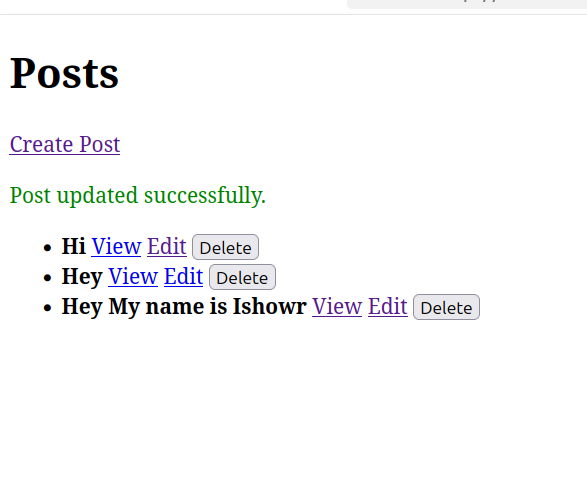
Create a project first and connect it to the database. And create a model and migration
php artisan make: model Post -m
public function up()

{
    Schema::create('posts', function (Blueprint $table) {
        $table->id();
        $table->string('title');
        $table->text('content');
        $table->timestamps();
    });
}
**Now php artisan migrate**
Now we need to create controller.
`php artisan make:controller PostController –resource`
Now add routes::
use App\Http\Controllers\PostController;
Route::resource(‘posts’, PostController::class);
## **Create Blade Views**
Make views in `resources/views/posts`:
– `index.blade.php` → List posts
– `create.blade.php` → Form to create
– `edit.blade.php` → Form to edit
– `show.blade.php` → View details
This is the routes:
Route::get(‘/’, [PostController::class, ‘index’]);
Route::resource(‘posts’, PostController::class);
This is index.blade.php code
Full controller code
<?php

namespace App\Http\Controllers;

use Illuminate\Http\Request;
use App\Models\Post;

class PostController extends Controller
{
    /**
     * Display a listing of the resource.
     */
    public function index()
    {
        $posts = Post::latest()->get();
        return view('posts.index', compact('posts'));
    }

    /**
     * Show the form for creating a new resource.
     */
   public function create()
    {
        return view('posts.create');
    }

    /**
     * Store a newly created resource in storage.
     */
    public function store(Request $request)
    {
        $request->validate([
            'title' => 'required|max:255',
            'content' => 'required',
        ]);

        Post::create($request->all());

        return redirect()->route('posts.index')
                         ->with('success', 'Post created successfully.');
    }

    /**
     * Display the specified resource.
     */
    public function show(Post $post)
    {
        return view('posts.show', compact('post'));
    }

    /**
     * Show the form for editing the specified resource.
     */
    public function edit(Post $post)
    {
        return view('posts.edit', compact('post'));
    }

    /**
     * Update the specified resource in storage.
     */
    public function update(Request $request, Post $post)
    {
        $request->validate([
            'title' => 'required|max:255',
            'content' => 'required',
        ]);

        $post->update($request->all());

        return redirect()->route('posts.index')
                         ->with('success', 'Post updated successfully.');
    }

    /**
     * Remove the specified resource from storage.
     */
    public function destroy(Post $post)
    {
        $post->delete();

        return redirect()->route('posts.index')
                         ->with('success', 'Post deleted successfully.');
    }
}
Make sure to update your model as well…
<?php

namespace App\Models;
use Illuminate\Database\Eloquent\Factories\HasFactory;
use Illuminate\Database\Eloquent\Model;

class Post extends Model
{

     use HasFactory;

    protected $fillable = ['title', 'content'];


}
index.blade.php
<!DOCTYPE html>
<html>
<head>
    <title>Posts</title>
</head>
<body>
    <h1>Posts</h1>

    <a href="{{ route('posts.create') }}">Create Post</a>

    @if(session('success'))
        <p style="color: green;">{{ session('success') }}</p>
    @endif

    @if($posts->count())
        <ul>
            @foreach ($posts as $post)
                <li>
                    <strong>{{ $post->title }}</strong>
                    <a href="{{ route('posts.show', $post->id) }}">View</a>
                    <a href="{{ route('posts.edit', $post->id) }}">Edit</a>
                    <form action="{{ route('posts.destroy', $post->id) }}" method="POST" style="display:inline;">
                        @csrf
                        @method('DELETE')
                        <button type="submit" onclick="return confirm('Are you sure?')">Delete</button>
                    </form>
                </li>
            @endforeach
        </ul>
    @else
        <p>No posts yet.</p>
    @endif

</body>
</html>
create.blade.php
<!DOCTYPE html>
<html>
<head>
    <title>Create Post</title>
</head>
<body>
    <h1>Create New Post</h1>

    @if($errors->any())
        <div style="color:red;">
            <ul>
                @foreach($errors->all() as $error)
                  <li>{{ $error }}</li>
                @endforeach
            </ul>
        </div>
    @endif

    <form action="{{ route('posts.store') }}" method="POST">
        @csrf
        <label>Title:</label><br>
        <input type="text" name="title" value="{{ old('title') }}"><br><br>

        <label>Content:</label><br>
        <textarea name="content" rows="5">{{ old('content') }}</textarea><br><br>

        <button type="submit">Save</button>
    </form>

    <a href="{{ route('posts.index') }}">Back to Posts</a>
</body>
</html>
edit.blade.php
<!DOCTYPE html>
<html>
<head>
    <title>Edit Post</title>
</head>
<body>
    <h1>Edit Post</h1>

    @if($errors->any())
        <div style="color:red;">
            <ul>
                @foreach($errors->all() as $error)
                  <li>{{ $error }}</li>
                @endforeach
            </ul>
        </div>
    @endif

    <form action="{{ route('posts.update', $post) }}" method="POST">
        @csrf
        @method('PUT')
        <label>Title:</label><br>
        <input type="text" name="title" value="{{ old('title', $post->title) }}"><br><br>

        <label>Content:</label><br>
        <textarea name="content" rows="5">{{ old('content', $post->content) }}</textarea><br><br>

        <button type="submit">Update</button>
    </form>

    <a href="{{ route('posts.index') }}">Back to Posts</a>
</body>
</html>
Show.blade.php
<!DOCTYPE html>
<html>
<head>
    <title>{{ $post->title }}</title>
</head>
<body>
    <h1>{{ $post->title }}</h1>
    <p>{{ $post->content }}</p>

    <a href="{{ route('posts.index') }}">Back to Posts</a>
</body>
</html>